a brief orientation
Hello.
yunit is now installed. A short orientation, and you read.
A few words above received a small translation. yunit does this on any page in your target language, picking the words it thinks you do not yet know and letting the rest stay as the author left them.
Miguel de Cervantes · Don Quijote de la Mancha
to save
Click any underlined word.
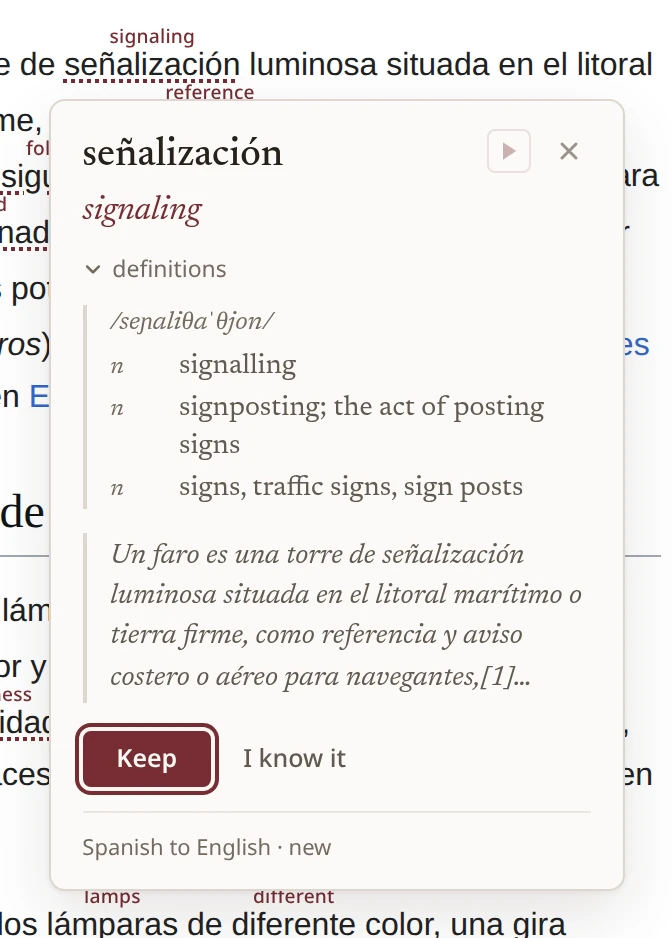
A small panel opens beside it. The translation sits at the top, the sentence the word arrived in just below, then a quick definition and the sound of the word spoken aloud. A second click saves both the word and its sentence into your lexicon.
the reach
Wherever you read.
The web you already read. Articles and Wikipedia, blogs and news feeds, novels rendered as plain HTML, drafts in another tab. yunit picks up wherever your reading takes you.
Songs on YouTube. Open the lyrics overlay and yunit pulls the words in, holding each translated line on the timeline so it arrives as the singer arrives. A Premium sharpen toggle swaps in a language-model translation for the lines where idioms or wordplay would otherwise slip past.
The web reading app and the mobile companion arrive next, with the same lexicon coming along.
the mark in your toolbar
your lexicon
Behind the mark.
Everything you save gathers behind the yunit mark in your toolbar. Each word is held alongside the sentence it came from, organized by language pair, scheduled for review, and surfaced in your reading again at the moments it should be seen.
yunit follows at the rhythm you read, and the popup in your toolbar holds the rest. When you want the whole map, the guide has every surface, control by control.